Showing posts with label Photography. Show all posts

Sunday, March 27, 2022

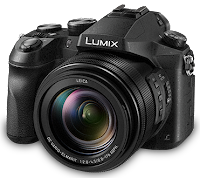
Lumix DMC-FZ2500 Video

Lumix DNC-FZ2500
Lumix DMC-FZ2500
The Lumix DMC-FZ2500 is great for sports action video!

Panasonic makes two great large (1") sensor Lumix bridge cameras with excellent Leica-branded superzoom lenses:

  • DMC-FZ1000: great stills camera that also does very good video.
  • DMC-FZ2500: great video camera that also does very good stills.
While the FZ2500 has a rich and powerful video feature set, its still image heritage makes the optimum video setup a bit tricky. For example, the viewfinder display in "S" Creative Video Mode shows the shutter speed but not the aperture. (Go figure.)

Action Sports Recommendations

  • MP4 LPCM FHD 50M 60p
    • Recording Format. Choose either MP4 LPCM or MOV (which are essentially identical) based on your own workflow. If in doubt, choose MP4 LPCM.
    • Frame Rate. For action video, 60 fps (frames per second) gives smoother results than lower frame rates. That limits resolution to 1080p Full HD (FHD, not 4K), but that's usually sufficient for most purposes.
    • Bitrate. 100M (Mbps) gives highest quality, but 50M is probably fine if you won't be doing heavy post-processing. 200M ALL-I is not recommended because quality is actually lower than 100M. 
  • Mode. For smooth video, use a shutter speed twice the frame rate, so with 60 fps, use a shutter speed of 1/125 sec in Shutter Priority (S) mode.
  • Aperture. Unfortunately, the FZ2500 lens suffers increasingly from diffraction softness at apertures smaller than f/5.6, so aperture should be no smaller than f/8.
  • ND. Thankfully, the FZ2500 has built-in ND (neutral density) filters that can be used to keep the aperture large enough for sharp images. In general, 1/4 works well in outdoor sunlight with 1/125 sec shutter speed. Unfortunately, the viewfinder does not display the aperture in "S" Creative Video Mode, so either shoot video in Shutter Priority (S) mode, or switch temporarily to S mode to check the aperture set by the camera.
  • Sample video with these settings: SailGP Practice, San Francisco Bay, 25 Mar 2022 - YouTube
  • Stills. Shutter speed of 1/125 sec is often too slow for action sports. For different settings:
    • Use Shutter Priority (S) with ND on for video.
    • Use Aperture Priority (A) with ND off for stills, with lens wide open. 
    • Unfortunately, unlike FZ1000, FZ2500 has only one Mode dial setting for Custom mode, so switching between Custom modes is a clumsy menu operation.

SanDisk Extreme PRO

Notes

  1. Except as noted, default settings are recommended.
  2. Continuous Autofocus (AFC) works well in tracking moving subjects.
  3. i.Dynamic Auto can help on dynamic range.
  4. Diffraction Compensation is just extra sharpening and should not be used.
  5. AF/AE Lock can help when lighting is variable.

Tips

Happy shooting!

Tuesday, September 25, 2018

Memory Card for GoPro

Samsung EVO Plus microSDXC
Which memory cards are good for GoPro HERO action cameras?

Many professional photographers and videographers swear by SanDisk Extreme and Lexar Professional memory cards because they have proven to be tops in reliability and performance.

But as of September 2018, arguably the best card for GoPro HERO (and for most other devices) is the Samsung EVO Plus (2017 Model). With Class 10 U3 speed (up to 100MB/s Read and 60MB/s Write), the 64GB capacity (with adapter) is widely available for only $21.

For reliability and performance, format cards with the official SD Association Memory Card Formatter.

Counterfeit cards are a huge problem. To protect against counterfeits, always (a) buy from a major reputable reseller like B&H, and (b) test before use with H2testw 1.4. Example of testing a 64GB Samsung EVO Plus in a Lenovo ThinkPad T460p:
Test finished without errors.
Writing speed: 57.7 MByte/s
Reading speed: 70.2 MByte/s
H2testw v1.4
(After testing with H2testw, be sure to either delete the test files from the card or format the card.)

Wednesday, May 25, 2016

Windows Monitor Calibration Issue

Calibrating your monitor is important because most monitors are not calibrated by the manufacturer, and do not display accurate color. See Calibrate Your Monitor.

But even after you've calibrated your monitor, it may not display accurate color, especially if you are running Microsoft Windows and have uninstalled the calibration software.

If you research this issue you're likely to be told that Windows doesn't load the calibration CLUT (Color Look-Up Table) properly, and advised to keep calibration software installed. But even then your monitor may not stay calibrated, shifting between calibrated and uncalibrated for no apparent reason. The truth is that monitor calibration can be made to work properly under Windows if you take the necessary steps:
  1. Stop Losing Display Calibration with Windows 7 details how to configure Windows to use a calibration color profile. But that may work for you at first, only to shift back again. Something may seem to be fighting with Windows. If so, check the article again, and see the note regarding Intel display drivers, which will lead you to:
  2. Intel’s Video Drivers Kill Display Calibration, which explains how Intel interferes with display calibration, and how to solve the problem by disabling the Intel Persistence module. If you use Sysinternals Autoruns to disable Persistence, your monitor should then stay calibrated even without calibration software installed!


Monday, April 6, 2015

Calibrate Your Monitor

Datacolor Spyder Calibration
Unless there are obvious problems, most people just assume their monitors work correctly. But the truth is that mass produced monitors are usually significantly off in terms of color balance, too green, too blue, etc, and most people just don't notice unless they see two monitors side by side with the same image. In addition to showing us wrong colors, incorrect color balance can make printing images an exercise in frustration.

Fortunately, monitor calibration is an easy way to solve the problem, and should be done by anyone who cares about color. Unfortunately, trying to do it by eye (e.g., Windows Display Color Calibration) is crude and imperfect at best. What's needed for good results is a colorimeter, a hardware device that can accurately measure the color of a monitor.

Of the many colorimeters available, one of the best and most affordable is the Datacolor Spyder, which can be purchased new for as little as $60 (basic Express version). If you just want to calibrate once, a local camera shop may offer calibration as a service, or you can inexpensively rent the the full SpyderHD package from BorrowLenses.

Highly recommended. You'll probably be amazed by the difference.

Notes:

  1. Works for both Windows and Mac.
  2. Burn in a new monitor for at least 24 hours before calibration.
  3. Warm up a monitor for at least an hour before calibration.
  4. Re-calibrate every 30-90 days for best results because color balance can change as a monitor ages.
  5. Windows can interfere with calibration. See Windows Monitor Calibration Issue.
  6. An option that can give even better results with a supported colorimeter is (free) DisplayCAL (Open Source Display Calibration and Characterization powered by Argyll CMS) software.

Monday, October 28, 2013

Tripods Recommended

Micro Tripod

Sometimes you need a really small tripod, like for taking a "selfie" (picture of yourself) with a smartphone, or (in my case) as a stand for a digital audio recorder. The usual mini tripods (even the smallest GorillaPod) are a bit clunky. A cool alternative is the sleek, neatly folding Jelly Legs Micro Tripod by Square Jellyfish. The legs can be adjusted and locked for uneven surfaces. There's even a micro ball head available, and a bracket to hold your smartphone. Recommended.


Standard Tripod (Photo and/or Video)

A good, affordable tripod for general purpose photo and video use that's relatively light in weight but still solid is the SLIK U8000 Photo/Video Tripod. Features: 3-way fluid effect pan head. Quick release shoe for easy mounting and removal of camera or camcorder. Oversize, single action, speed release leg locks for adjusting tripod height in seconds. Geared center column. Length folded 23 1/4 in, Height extended 59 1/12 in, Extension center column 11 5/6 in, Weight 3 lbs 5 oz. Recommended.

Monday, October 14, 2013

Great Compact Digital Cameras 2013

Here's how I get great images and video: 

Panasonic Lumix DMC-FZ200
  • Fast f/2.8 aperture across full zoom range
  • 24x optical zoom (25mm wide angle to 600mm telephoto)
  • 12.1-megapixel MOS Sensor
  • Full HD 1080/60p video
  • 1.3MP Electronic Viewfinder
  • 3.0-inch Free-Angle LCD
  • High-speed autofocus
  • Hotshoe
  • External microphone compatible
  • Filter and conversion lens compatible
  • It's what I use
Panasonic Lumix DMC-LF1
  • Fast f/2.0 aperture
  • 7.1x optical zoom (28mm wide angle to 200mm telephoto)
  • Larger 1/1.7-inch, 12.1-megapixel MOS Sensor
  • Full HD 1080/60i video
  • Electronic viewfinder
  • 3.0-inch high resolution LCD
  • Pocket size
  • Wireless (Wi-Fi and NFC)
  • Great all-around camera for most people
What both Lumix cameras share
  • Fantastic Leica lens (glass matters more than megapixels!) 
  • Optical Image Stabilization
  • Stereo microphone
  • Intelligent Auto Mode
  • Face Recognition
  • RAW image capture
  • Excellent image and video quality
Honorable Mention: Sony Cyber-shot RX100
  • Fast f/1.8 aperture Carl Zeiss lens
  • 3.6x zoom (28mm wide angle to 100mm telephoto)
  • Large 1" CMOS, 20.2 megapixels sensor
  • Optical Image Stabilization
  • Full HD 1080/60p video
  • Compact size
  • RAW image capture
  • Superb image and video quality

Friday, February 19, 2010

Great Compact Digital Cameras 2010

UPDATED: Great Compact Digital Cameras 2013

Here's how I get my great images: 

Panasonic Lumix DMC-FZ35
  • 18x zoom
  • 27 mm wide angle
  • Fast f/2.8 lens
  • Conversion lens compatible
  • Ultra high-speed autofocus
  • Stereo mic
  • 12.1 megapixel
  • It's what I use
  • Find It Online with Google Products
Panasonic Lumix DMC-ZS3
What they both share
  • Fantastic Leica super-zoom lens
    (glass matters more than megapixels!)
  • Optical Image Stabilization
  • Intelligent Auto Mode
  • Face Recognition
  • AVCHD Lite HD video
  • Superb image quality